Savor Documentation
Thank you for purchasing the Savor theme. If you don't find the answers to your questions in this help file, please feel free to contact via my profile page. Thanks!
Getting Started
If you are new to WordPress here's what you have to do:
Installing WordPress
In order to install the current version of WordPress Theme, please go to https://wordpress.org and download the current version of WordPress. For information on how to install WordPress, please see the WordPress codex page https://codex.wordpress.org/Installing_WordPress .
Installing Theme
You can do it in 2 ways:
- a. Via WordPress Admin: Go to Appearance > Install Themes > Upload and choose savor.zip file ((make sure you are not uploading the whole zip file that you've downloaded (including demo content, documentation) but only the savor.zip file). Click Install Now.
- b. Via FTP: Upload savor folder into wp-content/themes folder.
- After you've installed the theme make sure to activate it.
Import Demo
If you want your website to look like the live demo, then customize it as you want, follow these steps:
After the theme is activated make sure to install and activate the required and recommended plugins: MT Savor, Contact Form 7 . The plugins are necessary for having the features presented in the demo. .

- Install and activate One Click Demo Import plugin.
- Go to Appearance > Import Demo Data and click the Import Demo Data button.
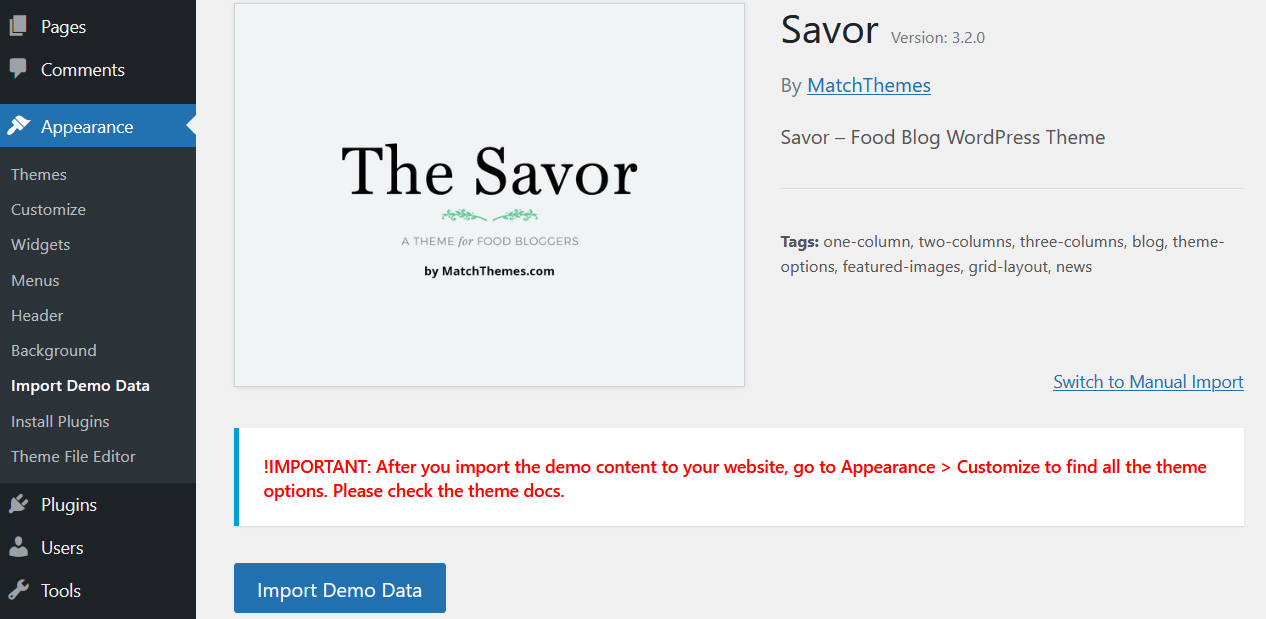
- A new page will open. Click "Continue & Import" button. Wait until the demo content is imported to your website.
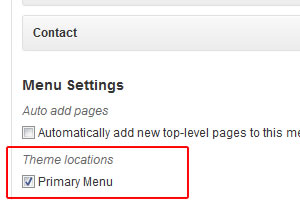
- If the menu in the header doesn't appear, go to Appearance > Menus, select "Primary Menu" at the bottom of the page and click Save.
After you've made the steps above, you'll find all the theme customization options ( add logo, change article layouts, colors, fonts etc. ) in Appearance > Customize
If you didn't install XML file like in preview, then you would have to go STEP BY STEP....Setup Menu
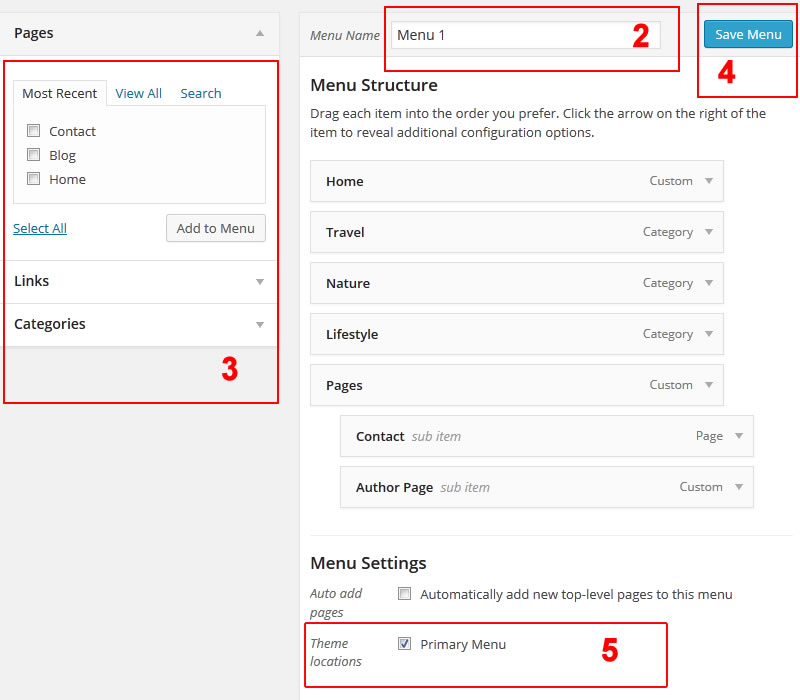
- Go to Appearance - > Menus tab
- Add new menu, enter Menu Name
- Add Menu Items. Select the pages you've just created and add them to the menu
- Drag & drop the menu items as you like. Check the image below. Than save the menu
- !IMPORTANT: make sure the Theme Locations option is set to Primary Menu.
Pages General
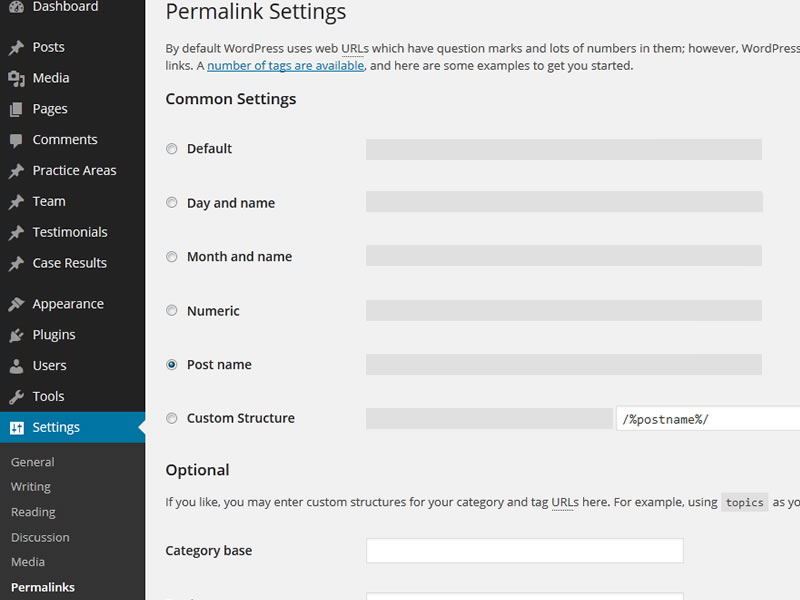
First go to Settings > Permalinks. Select from Common Settings > Post name option. This is for better SEO permalinks.
The theme comes with the following custom Page Templates:
- Default Template - The default page
- Full Width Template
How to use a template:
- Click Pages > Add New.
- Look for Page Attributes on the right side and click on the "Template" drop-down menu.
- Choose a page template.
- Click the Publish button above.
- Now you can add your new page to your Menu.
Setup Pages
Homepage
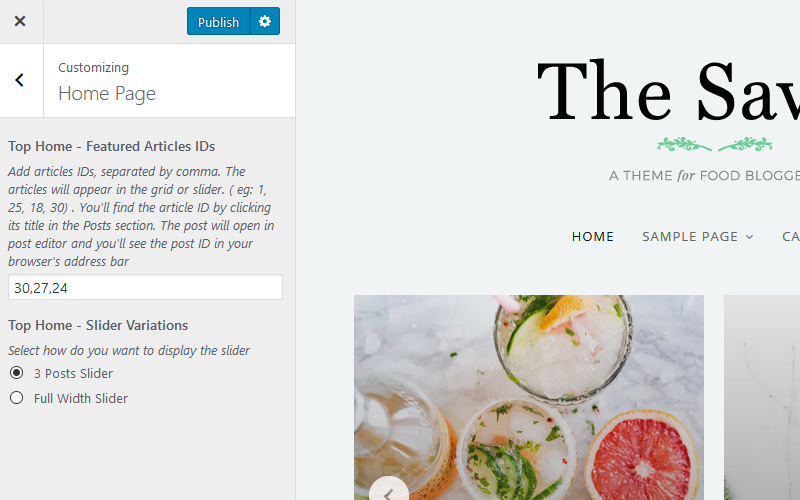
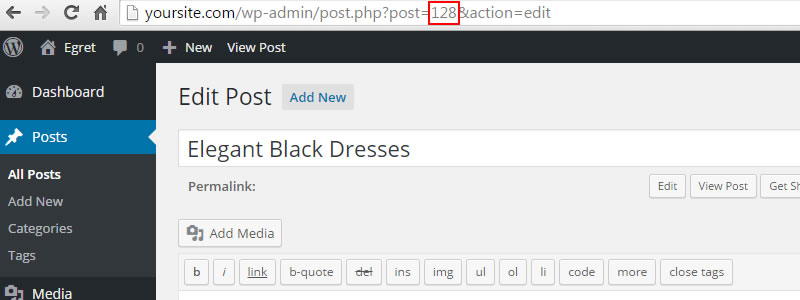
In order to add the home slider images, go to Appearance > Customizer > Home Page. In the Top Home - Featured Articles IDs field add the articles IDs you want in the slider , separated by comma.
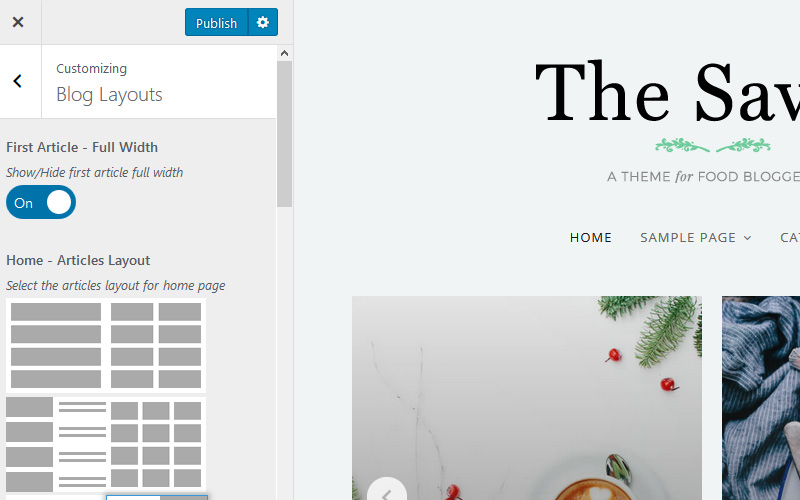
The Homepage has multiple layout variations. To select one of them, go to Appearance > Customizer > Blog Layouts.
Posts
Creating posts is nothing new if you have basic experience with WordPress. To add an image to a new post, go to Featured Image option and select / upload your image.
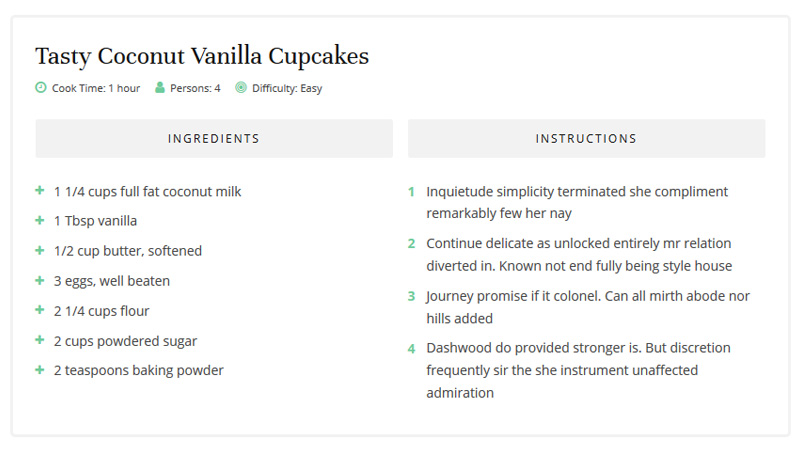
[food_recipe title="Tasty Coconut Vanilla Cupcakes" time="Cook Time: 1 hour" people="Persons: 4" level="Difficulty: Easy"]
<ul class="ingredients">
 	<li class="rtitle">Ingredients</li>
 	<li>1 1/4 cups full fat coconut milk</li>
<li>1 Tbsp vanilla</li>
<li>1/2 cup butter, softened</li>
</ul>
<ol class="instructions">
 	<li class="rtitle">Instructions</li>
 	<li>Inquietude simplicity terminated she compliment remarkably few her nay</li>
<li> Continue delicate as unlocked entirely mr relation diverted in. Known not end fully being style house</li>
 	<li>Journey promise if it colonel. Can all mirth abode nor hills added</li>

</ol>
[/food_recipe]
Contact Page
- Click Pages > Add New
- Look for Page Attributes on the right side and click on the Template drop-down menu. Select the "FullWidth" template
- Click Publish
- Install and activate the contact 7 plugin ( https://wordpress.org/plugins/contact-form-7/)
Go to Contact > Add New and create a new contact form
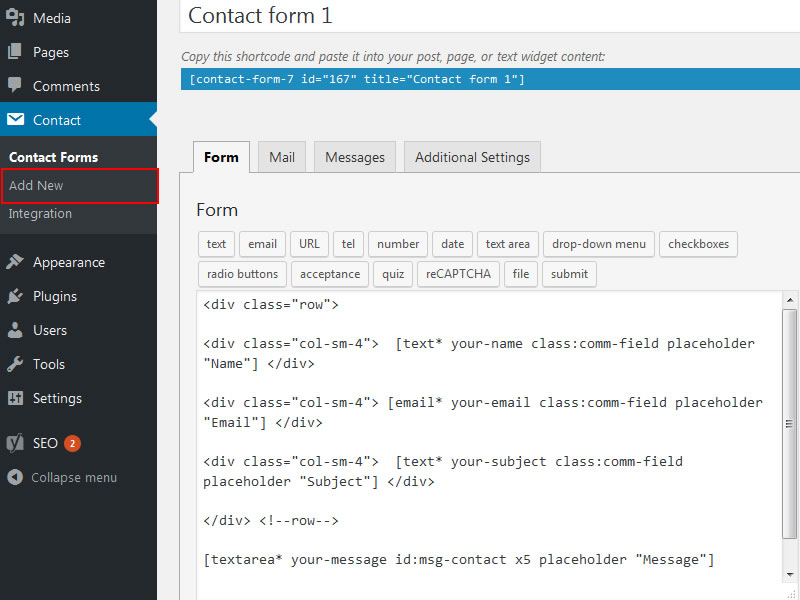
Add the following code in the Form option to look like in my demo
<div class="row"> <div class="col-sm-4"> [text* your-name class:comm-field placeholder "Name"] </div> <div class="col-sm-4"> [email* your-email class:comm-field placeholder "Email"] </div> <div class="col-sm-4"> [text* your-subject class:comm-field placeholder "Subject"] </div> </div> [textarea* your-message id:msg-contact x5 placeholder "Message"] <p class="contact-btn">[submit id:submit-contact "Send message"]</p>- Click the Save button. Copy the shortcode and paste it in the contact page.
Author Page
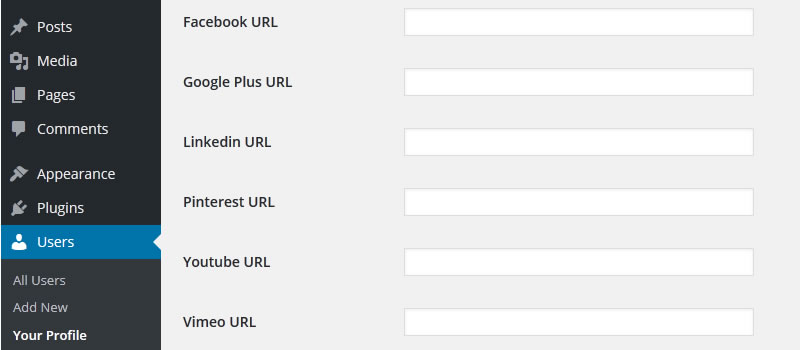
In order to customize the author page go to Users > Your Profile . There you'll find fields for social media. Also add small description at the "Biographical Info" to appear on the author page.
Customization
Widget Areas
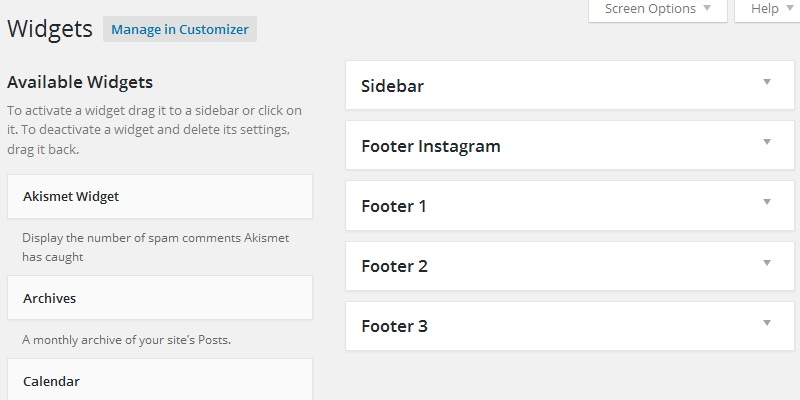
There are 5 widget areas for this theme. Go to Appearance > Widgets to use them.
Theme Customizer
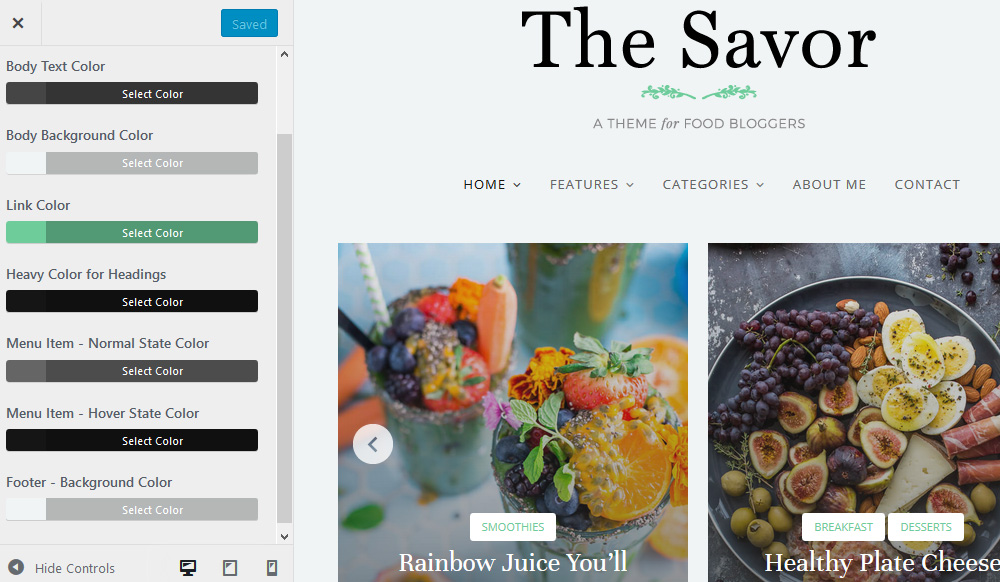
Savor is using the WordPress Live Customizer feature. Go to Appearance > Customize and change site title, colors, upload your logo and more. You'll see real time preview of changes you made to your site.
Shortcodes
Here's the list of available shortcodes:
-
Food Recipe shortcode:
	[food_recipe title="Food Recipe" time="Cook Time: 10 min" people="Persons: 6" level="Difficulty: Easy"]
<ul class="ingredients">
 	<li class="rtitle">Ingredients</li>
 	<li>2 1/2 Tbsp sparkling sugar</li>
 	<li>2 Tbsp honey</li>
 	<li>8 pink grapefruit</li>
 	<li>12 oz (eight 1.5 oz shots) vodka, bourbon or tequila</li>
 	<li>32 oz ginger beer</li>
 	<li>2 cucumbers</li>
 	<li>lots of crushed ice</li>
</ul>
<ol class="instructions">
 	<li class="rtitle">Instructions</li>
 	<li>Inquietude simplicity terminated she compliment remarkably few her nay</li>
 	<li> Continue delicate as unlocked entirely mr relation diverted in. Known not end fully being style house</li>
 	<li>Journey promise if it colonel. Can all mirth abode nor hills added</li>
 	<li> Dashwood do provided stronger is. But discretion frequently sir the she instrument unaffected admiration</li>
</ol>
[/food_recipe]
-
Blog Layout Grid v1 shortcode: [blog_grid_v1 cols="" count="" first_post="" cat=""]
The cols attribute value is 2,3,4,5.
The count attribute is optional.
The count attribute value is true / false.
The cat attribute is optional.
-
Blog Layout Grid v2 shortcode: [blog_grid_v2 cols="" count="" first_post="" cat=""]
The cols attribute value is 2,3,4,5.
The count attribute is optional.
The count attribute value is true / false.
The cat attribute is optional.
-
Blog Layout Grid v3 shortcode: [blog_grid_v3 cols="" count="" first_post="" cat=""]
The cols attribute value is 2,3,4,5.
The count attribute is optional.
The count attribute value is true / false.
The cat attribute is optional.
-
Blog Layout List shortcode: [blog_list style="" list="" count="" first_post="" cat=""]
The style attribute value is 1,2.
The list attribute value is left/right.
The count attribute value is true / false.
The cat attribute is optional.
-
Blog Layout List ZigZag shortcode: [blog_list_zigzag style="" count="" first_post="" cat=""]
The style attribute value is 1,2.
The count attribute value is true / false.
The cat attribute is optional.
-
Blog Layout Classic shortcode: [blog_classic count="" cat=""]
The count attribute value is true / false.
The cat attribute is optional.
Child Theme
Savor theme comes with a child theme in the main download package.
A child theme is a theme that inherits the functionality and styling of another theme, called the parent theme.
Child themes are recommended if you modify the theme files code and don't want to lose your customization when updating the theme to a new version.