Trying to improve your WordPress rankings can feel overwhelming, especially when technical settings, metadata, schema, redirects, and content optimization all compete for your attention. The good news is that the right plugin can simplify much of that work.
WordPress already offers a solid foundation for search visibility, but dedicated SEO plugins make it easier to manage important tasks such as title tags, meta descriptions, XML sitemaps, canonical URLs, redirects, and social metadata. Some tools also help with content analysis, internal linking, and WooCommerce SEO.
In this guide, we compare the best WordPress SEO plugins for 2026, including their strengths, limitations, and ideal use cases. Whether you need a beginner-friendly option, a lightweight plugin, or a more advanced SEO toolkit, this list will help you choose the right solution for your site.
How We Chose These WordPress SEO Plugins
To build this list, we focused on the features that matter most for real WordPress SEO workflows: title and meta description control, XML sitemaps, schema support, redirect management, internal linking tools, WooCommerce SEO options, ease of use, plugin performance, and overall value for money.
We also considered whether each plugin is best suited for beginners, advanced users, agencies, or site owners who need a lightweight SEO setup. Rather than looking only at feature quantity, we prioritized tools that solve practical SEO tasks efficiently and fit different types of WordPress websites.
Importance of SEO for WordPress Websites
SEO plugins help WordPress users handle essential optimization tasks without needing advanced technical knowledge. Depending on the plugin, this can include editing SEO titles and meta descriptions, generating XML sitemaps, managing redirects, adding schema markup, optimizing social metadata, and improving on-page SEO.
That said, the best WordPress SEO plugin depends on your site type and goals. Some plugins are better for beginners, some offer deeper schema and automation features, and others are better for lightweight setups or WooCommerce stores. That’s why comparing features, usability, and use cases matters more than simply choosing the most popular plugin.
Best SEO Plugins for WordPress
Here’s the table of contents for top SEO plugin picks, but for a thorough understanding, dive into the comprehensive reviews of the best SEO WordPress plugins detailed further below.
- Yoast SEO
- All in One SEO
- Rank Math
- SEOPress
- The SEO Framework
- Squirrly SEO
- XML Sitemap Generator
- MonsterInsights
- WP Rocket
- Autoptimize
- ShortPixel
- Smush
1. Yoast SEO
Yoast SEO is a highly popular WordPress plugin that has gained immense popularity among website owners, boasting over 5 million active installations. We’ll use this SEO plugin here on MatchThemes. It offers a diverse range of features that significantly improve on-page optimization and overall website performance.

Yoast SEO is one of the most widely used WordPress SEO plugins and remains a solid option for users who want guided optimization inside the editor. Its user-friendly interface allows users to effortlessly add SEO titles, descriptions, and Open Graph metadata throughout their site. Additionally, the plugin generates automated XML sitemaps to facilitate search engine crawling and seamlessly imports data from other SEO tools.
Notable features include a readability checker, social media previews, and performance enhancements that contribute to an enhanced user experience.
Key features of Yoast SEO:
- Real-time content analysis with actionable suggestions for improvement
- XML sitemap generation for easy indexing by search engines
- Advanced meta tag optimization, including title and meta description customization
- Readability analysis to ensure user-friendly content
- Social media integration for seamless sharing on platforms like Facebook and Twitter
With the premium version, users can benefit from multi-keyword optimization, social previews, internal link suggestions, and redirect management. Priced at $99 per year, Yoast SEO’s premium offerings also include structured data capabilities, Semrush integration, and regular updates, making it an indispensable tool for efficient SEO management.
Best for: Beginners and content-focused sites that want a proven SEO workflow.
Main tradeoff: Some advanced features, such as redirect management and multiple keyword optimization, require the premium plan.
2. All in One SEO
All in One SEO (AIOSEO) is acclaimed as a leading SEO plugin for WordPress, boasting over 3 million active users. This plugin offers a suite of optimization tools aimed at enhancing search rankings effortlessly.

AIOSEO’s highlights include an intuitive setup wizard, on-page analysis, a smart meta tag generator with dynamic values, and rich snippet schema markup. It supports advanced XML sitemaps, SEO health checks, and social media integration for Open Graph metadata.
Additionally, it features WooCommerce support for e-commerce optimization, comprehensive control over technical SEO settings, and innovative tools like Link Assistant for internal linking to help you increase website traffic.
Key features of All in One SEO Pack:
- XML sitemap generation and submission to major search engines
- Advanced canonical URL management to prevent duplicate content issues
- Title and meta tag optimization for improved click-through rates in search results
- Social media integration for easy sharing on various platforms
- Built-in SEO audit tool to identify areas for improvement
Available in both free and pro versions ( starting from $49/year ), AIOSEO caters to both novices and advanced users, streamlining site optimization without the need for complex SEO knowledge.
Best for: Site owners who want a balance of ease of use and advanced SEO options.
Main tradeoff: Some of the strongest automation and WooCommerce features are gated behind paid plans.
3. Rank Math
Rank Math is a highly capable and flexible freemium SEO plugin designed specifically for WordPress. It is well-known for its extensive range of features that aim to improve site optimization.

Key Features for Rank Math SEO plugin:
- An intuitive setup wizard that simplifies the process of configuring SEO settings.
- Content AI that assists in creating SEO-friendly content.
- Integration with Google Schema Markup, supporting more than 16 types of Rich Snippets.
- The ability to optimize posts for an unlimited number of focus keywords.
- Seamless integration with Google Search Console, Google Analytics, and keyword ranking tools.
- Pre-selected optimal settings for easy usage, along with integration with the LSI Keyword Tool.
- An advanced SEO analysis tool with 30 detailed tests and a module-based system for customized use.
- A smart redirection manager and Local Business SEO capabilities.
- SEO optimization breadcrumbs, a built-in 404 monitor, in-depth content analysis, and suggestions for internal linking.
- A role manager for team collaboration and compatibility with multisite setups.
- Lightweight code that ensures optimal website performance.
Rank Math is designed as a feature-rich SEO plugin for users who want more control over schema, metadata, redirects, and content optimization from one interface. By utilizing these features, users can achieve improved search engine rankings and gain more website traffic.
Best for: Users who want a feature-rich SEO plugin with deep schema and automation options.
Main tradeoff: The large number of settings can feel overwhelming for beginners.
4. SEOPress
SEOPress is a powerful WordPress SEO plugin that provides a comprehensive range of tools to optimize your website. It caters to both beginners and advanced users, offering features like meta title and description editing with dynamic variables, support for Open Graph and Twitter Cards, creation of XML and HTML sitemaps, and integration with Google Analytics for detailed traffic analysis.

Key Features of SEOPress:
- Universal SEO metabox for editing from any page builder or theme.
- White-labeled and ad-free, even in the free version.
- Content analysis with unlimited target keywords.
- One-click metadata import from other plugins or CSV files.
- AI integration for generating meta titles, descriptions, and alt texts.
- Support for Google Indexing API and IndexNow API for rapid content indexing.
- Social media previews for Facebook and Twitter.
- Customizable canonical URLs and meta robots.
- Sitemaps for improved indexing, including image sitemaps for Google Images.
- Support for Google Knowledge Graph and integration with Microsoft Clarity.
SEOPress is available as a free plugin with essential features, while the Pro version offers extended capabilities for a flat rate of $49/year for unlimited sites. This emphasizes its cost-effectiveness and all-in-one approach to SEO management.
Best for: Agencies, freelancers, and users who want strong features at a competitive price.
Main tradeoff: Its interface is less familiar to users coming from Yoast or AIOSEO.
5. The SEO Framework
The SEO Framework plugin is a fast and non-intrusive tool that enhances SEO for WordPress users. It offers a clean interface without ads or upsells and focuses on essential SEO features to ensure a fast and optimized website.

Key features include:
- ad-free and lightweight design
- automatic configuration of SEO essentials
- colored scales for SEO ratings
- open API for developers
- adherence to WordPress security and best practices
- privacy-oriented with no data collection
This plugin simplifies the SEO process by generating meta tags, optimizing social sharing, and following Google’s guidelines, making it a reliable solution for improving site visibility and avoiding common SEO mistakes.
Best for: Users who want a lightweight, no-ads SEO plugin focused on essentials.
Main tradeoff: It offers less hand-holding than some beginner-focused alternatives.
6. Squirrly SEO
Squirrly SEO is an ideal choice for individuals who lack expertise in SEO but are in need of a user-friendly and all-inclusive SEO solution. It provides real-time SEO advice while you type, utilizing AI-driven suggestions to optimize keyword usage and enhance content.

Key Features of SEO Squirrly include:
- On-page SEO guidance in real-time with green light indicators.
- AI-powered SEO consultant for personalized site optimization.
- Keyword research tool and portfolio management.
- SEO content grading and comprehensive analysis.
- Readability checks to ensure SEO and human-friendliness.
- Support for Open Graph and Twitter Card for social sharing.
- Suggestions for internal linking and 301 redirects.
- Advanced SEO audits and continuous monitoring.
- Tracking of keyword ranking and graphical representation of achievements.
Best for: Beginners who want real-time SEO guidance while writing content.
Main tradeoff: Its workflow may feel too prescriptive for experienced SEO users.
7. XML Sitemap Generator
The XML Sitemap Generator plugin for WordPress is a straightforward and efficient SEO tool specifically focused on creating and managing XML sitemaps. It’s designed for users who prefer a dedicated sitemap solution without the need for an all-encompassing SEO plugin.

Key Features of the XML Sitemaps plugin:
- Automatic generation of XML sitemaps upon activation.
- Option to notify search engines after each update.
- HTML sitemap generation capability.
- Manual submission of sitemaps to search engine webmaster tools.
- More control and flexibility compared to the default WordPress sitemap feature.
- Supports all WordPress generated pages and custom URLs.
- Supports custom post types and taxonomies for comprehensive indexing.
- Long-standing reputation with over a decade of support and high ratings.
This plugin ensures that all your website content is indexed by search engines efficiently, enhancing your SEO efforts with minimal complexity.
Best for: Users who only need dedicated sitemap functionality without a full SEO suite.
Main tradeoff: It does not replace a complete SEO plugin for titles, schema, redirects, or on-page analysis.
Supporting WordPress Plugins That Help SEO Indirectly
The plugins below are not full SEO plugins in the same sense as Yoast, Rank Math, or AIOSEO. However, they can still support SEO indirectly by improving analytics, site speed, Core Web Vitals, and image performance.
8. MonsterInsights
MonsterInsights is a well-known plugin for WordPress that integrates seamlessly with Google Analytics. This SEO tool plugin main purpose is to provide comprehensive insights directly within the WordPress dashboard. The plugin is specifically designed for users who want to make informed marketing decisions based on real data rather than guesswork.

Some of the key features of MonsterInsights include:
- Easy integration with Google Analytics.
- User-friendly reports that are easily readable within the WordPress dashboard.
- Tracking of user origins, popular content, and user behavior on the website.
- E-commerce tracking to understand product popularity and identify customer drop-off points.
- Annotations feature for noting and tracking site changes and their impact on traffic.
- Simple setup process that doesn’t require a developer.
- Advanced Google Analytics tracking features like event and e-commerce tracking.
- Customized analytics reports that highlight key performance indicators.
- Trusted by both major companies and small businesses for data-driven decision-making.
MonsterInsights simplifies Google Analytics for WordPress users, enabling them to optimize their site based on accurate, actionable data.
Best for: WordPress users who want analytics data inside the dashboard.
Main tradeoff: It supports SEO strategy indirectly, but it is not a full SEO plugin.
9. WP Rocket
WP Rocket is a highly regarded caching plugin for WordPress that is known for its ability to enhance website performance and improve loading times. These factors are crucial for improving SEO rankings.

Key Features of WP Rocket:
- User-friendly interface for easy setup without technical expertise.
- Browser caching to store frequently accessed resources on users’ devices.
- Server caching to create ready-to-serve pages on the server for quick delivery.
- Lazy loading for images to speed up page load times.
- Minification of CSS and JavaScript files to reduce their size and loading time.
- Cache preloading to ensure pages are preloaded and quickly accessible to visitors.
- Integration with Content Delivery Networks (CDNs) to serve content from servers closer to users.
WP Rocket is a premium solution with pricing starting at $59 per year. It offers a comprehensive suite of tools that are designed to optimize web performance and support a better user experience.
Best for: Site owners who want to improve performance and Core Web Vitals with minimal setup.
Main tradeoff: It improves technical performance, but it does not handle core on-page SEO tasks.
10. Autoptimize
Autoptimize is a powerful optimization plugin specifically created for WordPress. Its main aim is to boost website performance by targeting different aspects of resource optimization.
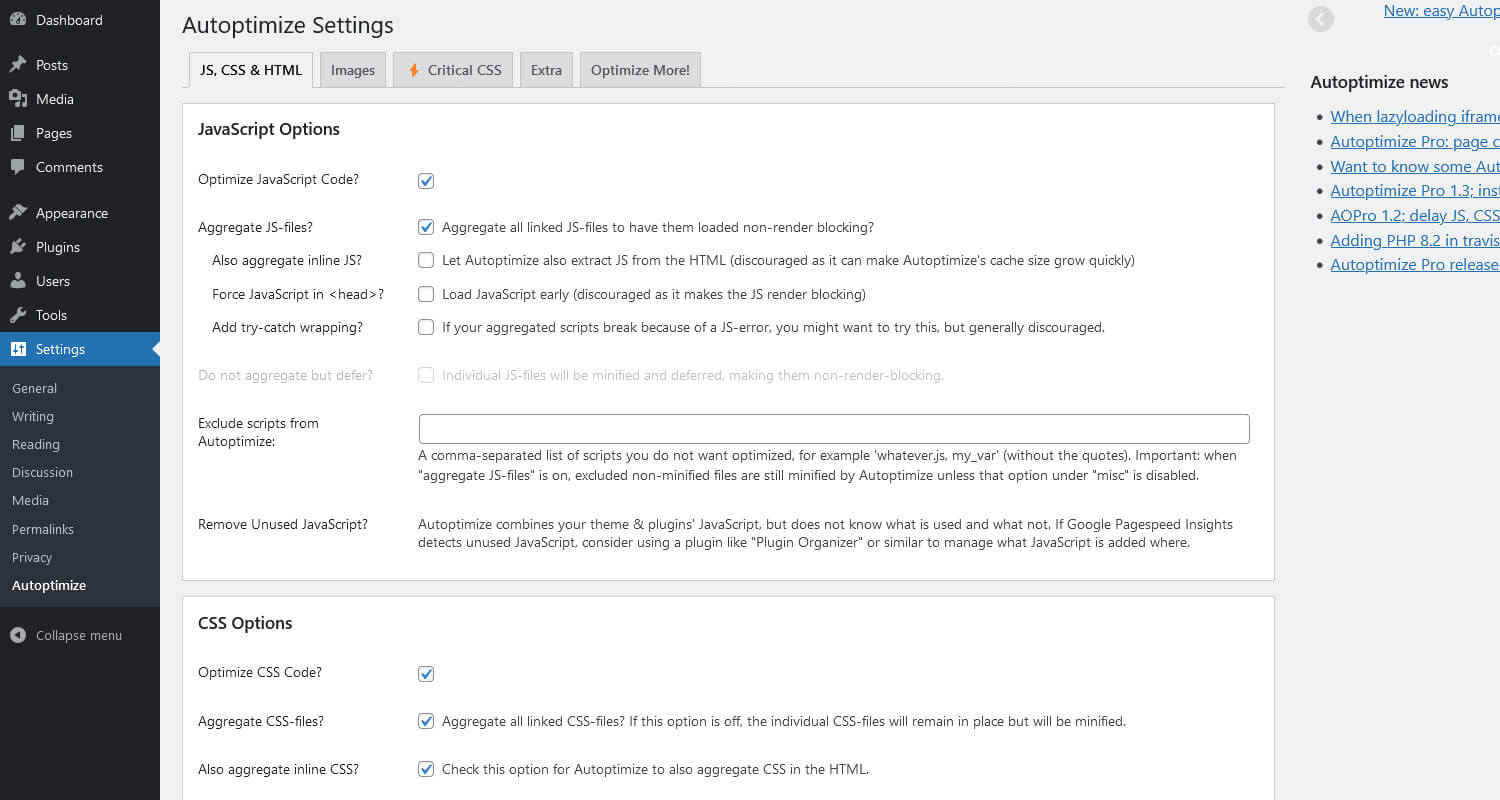
Key Features of Autoptimize:
- Aggregation, minification, and caching of scripts and styles.
- Inlining critical CSS and deferring full aggregated CSS.
- JavaScript optimization, including moving and deferring scripts to the footer.
- HTML code minification to reduce page size.
- Image optimization, including lazy-loading and support for WebP and AVIF formats.
- Google Fonts optimization for faster loading.
- Async loading for non-aggregated JavaScript.
- Removal of WordPress core emoji clutter.
- Compatibility with HTTP/2 for improved performance.
- API for customization to meet specific site needs.
Autoptimize is an ideal choice for users who are not familiar with manual optimization techniques as it offers a user-friendly approach to improve site speed by minimizing HTTP requests and optimizing resource delivery.
Best for: Users who want a free performance plugin to support faster page delivery.
Main tradeoff: Configuration can require testing to avoid front-end conflicts.
11. ShortPixel
ShortPixel is an image optimization plugin for WordPress that can help improve website speed and SEO. With over 300k active installations, this plugin offers a wide range of image compression and optimization features.

Key features of ShortPixel:
- Automatic compression of images for reduced file sizes
- Support for popular image file formats, including JPEG, PNG, and GIF
- Conversion of images to WebP format for improved loading times
- Retina image support for high-resolution displays
- Integration with popular WordPress page builders and gallery plugins
Best for: Sites with many images that need better compression and modern formats.
Main tradeoff: It helps image SEO and speed, but it is not a complete SEO solution.
12. Smush
Smush is another popular choice among image optimization plugins for WordPress. With over 1 million active installations, this plugin offers a range of features to compress and optimize images for improved website performance and SEO.

Key features of Smush:
- Automatic compression of images for reduced file sizes
- Support for popular image file formats, including JPEG, PNG, and GIF
- Lazy loading of images to improve page load times
- Bulk optimization of existing images for improved performance
- Integration with popular gallery plugins and page builders
Best for: Users who want easy image optimization inside WordPress.
Main tradeoff: It supports performance and image SEO, but does not replace an SEO plugin.
Final Thoughts on the Best WordPress SEO Plugins
The best WordPress SEO plugin depends on your goals, your experience level, and how much control you want over technical SEO settings. Yoast SEO and All in One SEO are strong choices for beginners, Rank Math and SEOPress offer broader feature sets for advanced users, and The SEO Framework appeals to those who prefer a lightweight setup.
If your main goal is on-page SEO, schema, redirects, and metadata management, start with one dedicated SEO plugin and avoid running multiple plugins that overlap in function. If you also want to improve speed, analytics, and image performance, use supporting tools such as caching, image compression, or analytics plugins alongside your main SEO plugin.
Whichever option you choose, focus on publishing helpful content, maintaining a clean technical setup, and regularly reviewing your site’s performance. The plugin can support your SEO strategy, but it works best when combined with strong content and a fast, user-friendly website.
FAQ – SEO Plugins for WordPress
1. Are SEO Plugins Free?
Many WordPress SEO plugins offer free versions, but the feature sets vary. Free versions are often enough for basic tasks such as editing meta tags, generating XML sitemaps, and improving on-page SEO, while advanced features like redirect managers, deeper schema options, and premium support are often reserved for paid plans.
2. What is the best SEO WordPress plugin?
It varies based on your needs. Yoast SEO is a popular choice for beginners, Rank Math is often preferred by users who want more built-in features, and All in One SEO is a strong all-around option. The best plugin for your site depends on your workflow, technical comfort level, and whether you need features such as WooCommerce SEO, schema markup, or redirect management.
3. Can I Use Two SEO Plugins in WordPress?
Using two full SEO plugins on the same WordPress site is generally not recommended. Features such as meta tags, canonical URLs, XML sitemaps, and schema markup can overlap and create conflicts. In most cases, it is better to use one main SEO plugin and add separate supporting plugins only for speed, analytics, or image optimization when needed.
4. Is Rank Math Better Than Yoast?
Neither plugin is universally better. Rank Math offers a broader feature set in its free version and appeals to users who want more built-in tools, while Yoast SEO is known for its simplicity, established reputation, and beginner-friendly content workflow. The better choice depends on whether you value ease of use or advanced configuration.