WordPress cache plugins can make a noticeable difference in how fast a website loads, how smoothly it handles traffic, and how well it performs in search results. A faster site improves the visitor experience, reduces bounce rates, and helps important pages feel more responsive on both desktop and mobile. Whether the goal is simple page caching, database cleanup, file minification, browser caching, or CDN integration, the right plugin can remove a lot of performance bottlenecks without requiring a full redesign. For many site owners, this is one of the easiest ways to improve site speed and create a better foundation for SEO and conversions.
The best WordPress cache plugin really depends on the type of site you run, your hosting setup, and how much control you want over optimization settings. Some plugins are better for beginners who want a quick setup, while others offer more advanced tools for experienced users who need deeper performance tuning. The smartest approach is to choose one that matches your site’s needs, test the results with speed tools, and keep refining performance over time so your website stays fast, stable, and competitive.
Here are the best WordPress cache plugins covered in this article:
Why Site Speed Matters
Site speed is a critical factor in providing a positive user experience. Slow-loading websites frustrate visitors and increase bounce rates, leading to potential loss of customers and revenue. Fast sites improve user experience and support better visibility in search, especially when pages load quickly, respond fast, and stay visually stable.
What is Caching?
Caching is the process of storing and retrieving data to improve website performance. When a user visits a website, their browser sends a request to the web server for the site’s content. The server then processes the request and sends back the necessary files to the browser, which assembles them to display the web page.
With caching, certain elements of the website are stored locally on the user’s device or in a temporary storage location. The next time the user visits the same page, the browser fetches the cached data instead of sending a request to the server. This significantly reduces page loading time and improves overall website performance.
In simple terms, caching reduces the amount of work your server has to do each time someone visits a page.
Best WordPress Cache Plugins
1. LiteSpeed Cache
LiteSpeed Cache is one of the most popular WordPress caching plugins. It combines page caching with optimization features such as image optimization, CSS/JS minification, lazy loading, and CDN integration. It’s especially strong on servers that use LiteSpeed, but it also includes useful optimization tools for many WordPress setups. LiteSpeed Cache ensures lightning-fast loading times, resulting in higher conversion rates and improved SEO performance. This plugin offers a user-friendly interface, making it a must-have for any WordPress website owner looking to enhance their site’s speed and overall performance.

Key Features:
- Free QUIC.cloud CDN Cache
- Image Optimization (Lossless/Lossy)
- Minify CSS, JavaScript, and HTML
- Minify inline & external CSS/JS
- Combine CSS/JS
- Automatically generate Critical CSS
- Lazy-load images/iframes
- Load CSS Asynchronously
- Defer/delay JS loading
- Browser Cache Support+
- Cloudflare API
- Single Site and Multisite (Network) support
- WebP image format support
2. WP Super Cache
WP Super Cache is a powerful plugin designed to enhance the performance and speed of WordPress websites. With its advanced caching techniques, it significantly reduces page load times, providing an improved user experience and boosting SEO rankings. This plugin stores a static version of your website, allowing it to serve pages quickly without the need for repetitive database queries.

One of the major advantages of WP Super Cache is its ability to handle high traffic volumes efficiently. By caching pages, it reduces the strain on your server, preventing crashes during peak times. This plugin also offers a range of customizable settings, allowing you to fine-tune caching options based on your specific needs.
Moreover, WP Super Cache seamlessly integrates with popular content delivery networks (CDNs), further enhancing website speed and global accessibility. This plugin also supports mobile caching, ensuring optimal performance across different devices.
However, there are a few considerations to keep in mind. WP Cache may occasionally cause compatibility issues with certain themes or plugins, requiring troubleshooting and potential adjustments. Additionally, frequent updates are necessary to ensure compatibility with the latest WordPress versions.
Key Features:
- Generates static HTML files from your dynamic WordPress blog
- Simple user mode
- Preloading
- CDN Support
- Garbage collection
3. WP Rocket
WP Rocket is a premium caching plugin designed to enhance the performance of WordPress websites. With its user-friendly interface and advanced features, WP Rocket offers numerous benefits for website owners and administrators.

One of the key advantages of WP Rocket is its ease of use. It requires minimal configuration, making it accessible even for those with limited technical knowledge. The plugin’s intuitive dashboard allows users to enable caching with a single click, thereby improving page load times and overall website speed.
Another significant advantage of WP Rocket is its comprehensive caching capabilities. It implements a range of caching techniques, such as page caching, browser caching, and database optimization, to ensure optimal performance. By reducing the number of requests made to the server and minimizing the load on the database, WP Rocket significantly improves the website’s responsiveness and user experience.
Furthermore, WP Rocket offers various additional features that contribute to its effectiveness. These include file compression, lazy loading of images, and DNS prefetching, all of which further optimize website performance.
Despite its numerous benefits, WP Rocket does have a few limitations. Firstly, it is a premium plugin ( price starts at $59 / year ), which means that users need to purchase a license to access its full range of features. Additionally, WP Rocket may not be compatible with certain themes or plugins, requiring users to troubleshoot or seek alternative solutions.
Key Features:
- Caching of all the pages
- Preloading the cache of pages
- Decreasing bandwidth usage with GZIP compression
- Minification and combination of JavaScript and CSS files
- Remove unused CSS
- LazyLoad images
- WebP compatibility (next-gen format created by Google to serve smaller images)
- Database optimization
- CDN integration
4. W3 Total Cache
W3 Total Cache is a powerful plugin that optimizes various aspects of your site, such as page loading speed, browser caching, and content delivery, to provide an exceptional user experience. With its intuitive interface and extensive configuration options, W3 Total Cache offers a comprehensive set of features that can significantly improve your site’s SEO rankings.
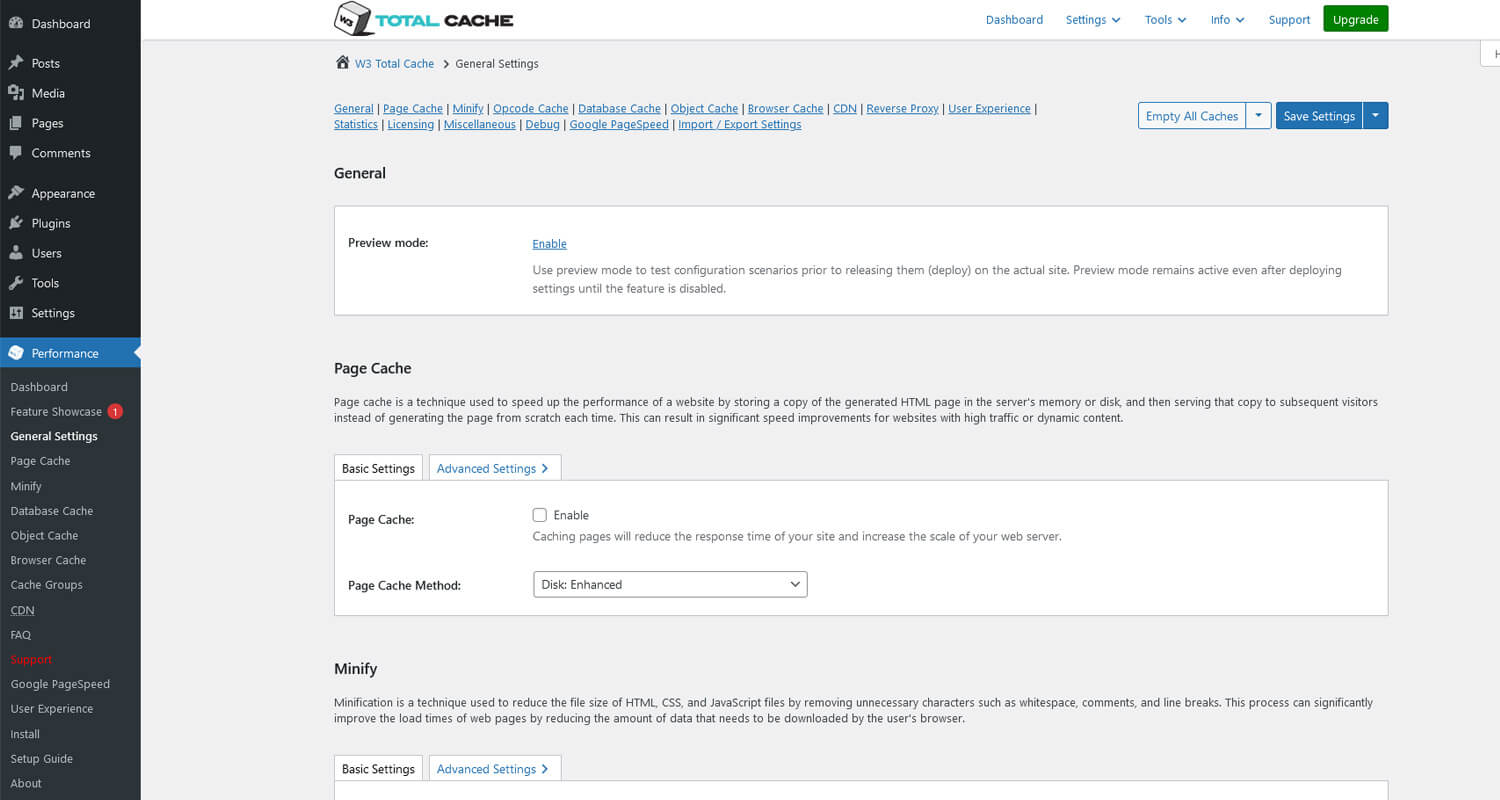
The pros of using W3 Total Cache are numerous. Firstly, it drastically reduces page load times, resulting in faster and smoother browsing for your visitors. This improved performance can lead to higher user engagement, lower bounce rates, and ultimately, better search engine rankings. Additionally, the plugin integrates seamlessly with popular content delivery networks (CDNs), enabling you to distribute your site’s content across multiple servers, further improving load times.
Moreover, W3 Total Cache optimizes browser caching, reducing the need for repeated downloads of static content and decreasing server load. This can result in substantial bandwidth savings and reduced hosting costs. The plugin also provides advanced caching options, such as database and object caching, which further enhance your site’s speed and responsiveness.
However, there are a few cons to consider. While W3 Total Cache offers extensive configuration options, setting it up correctly can be complex, especially for novice users. Improper configuration may lead to compatibility issues or even cause your site to break. Additionally, the plugin’s advanced features require some technical expertise to utilize effectively.
5. Autoptimize
Autoptimize is best used for front-end optimization and is often paired with a dedicated caching plugin. With its user-friendly interface and extensive range of features, Autoptimize has become a popular choice among website owners and developers.
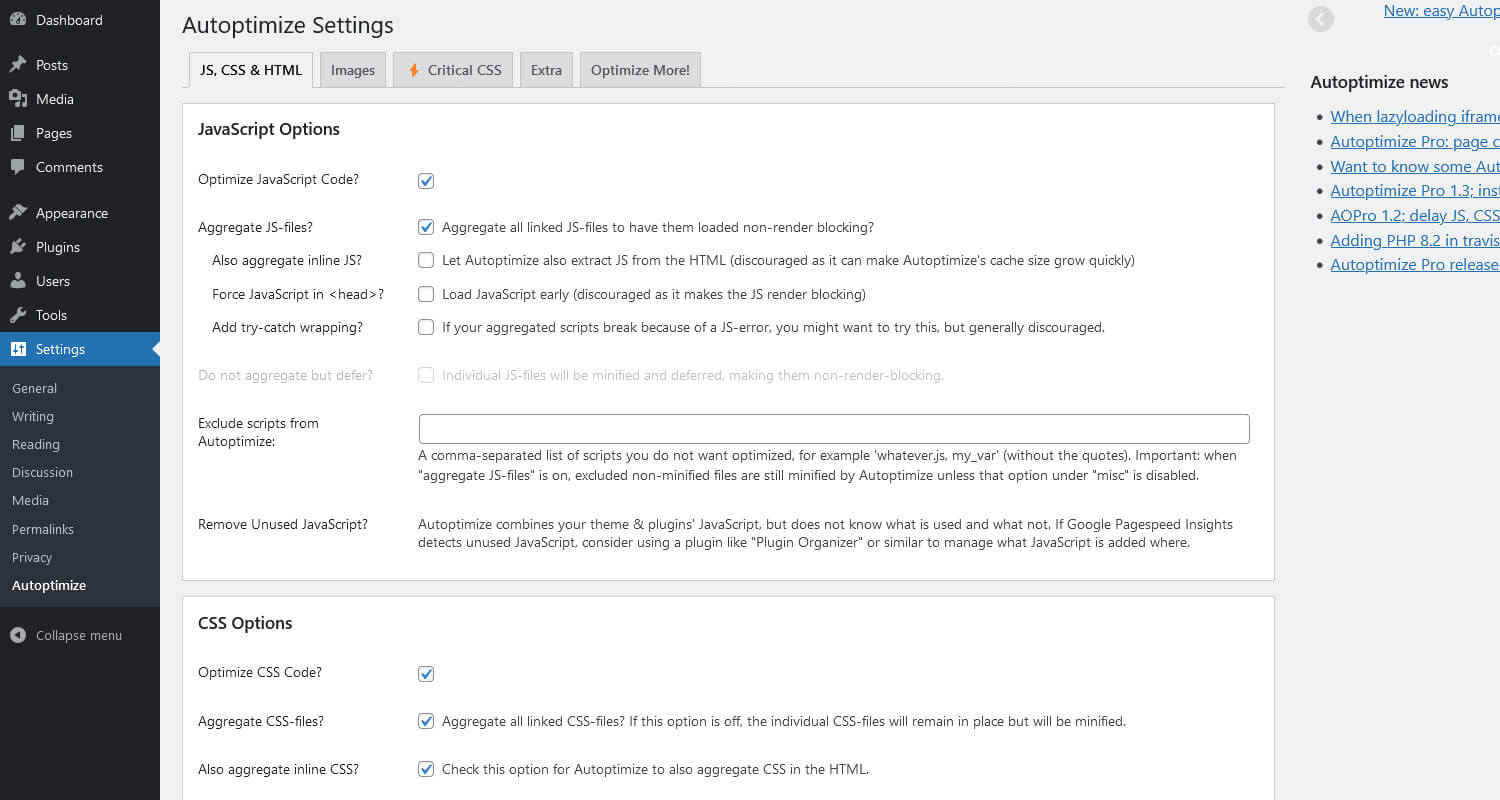
One of the main advantages of Autoptimize is its ability to significantly improve your website’s loading speed. By minifying and compressing your code, Autoptimize reduces the file size, allowing your pages to load faster and ensuring a seamless user experience. This is particularly important in today’s fast-paced digital world, where users expect instant access to information.
Another benefit of Autoptimize is its compatibility with various caching plugins, making it a versatile tool for optimizing different types of websites. Additionally, Autoptimize offers advanced optimization options, such as deferring JavaScript execution and optimizing Google Fonts, to further enhance your website’s performance.
6. WP Fastest Cache
WP Fastest Cache stands out as a great WordPress caching solution, used by over a million active users. Offering a seamless blend of efficiency with an easy-to-navigate dashboard, this plugin promises both advanced functionalities and simplicity.
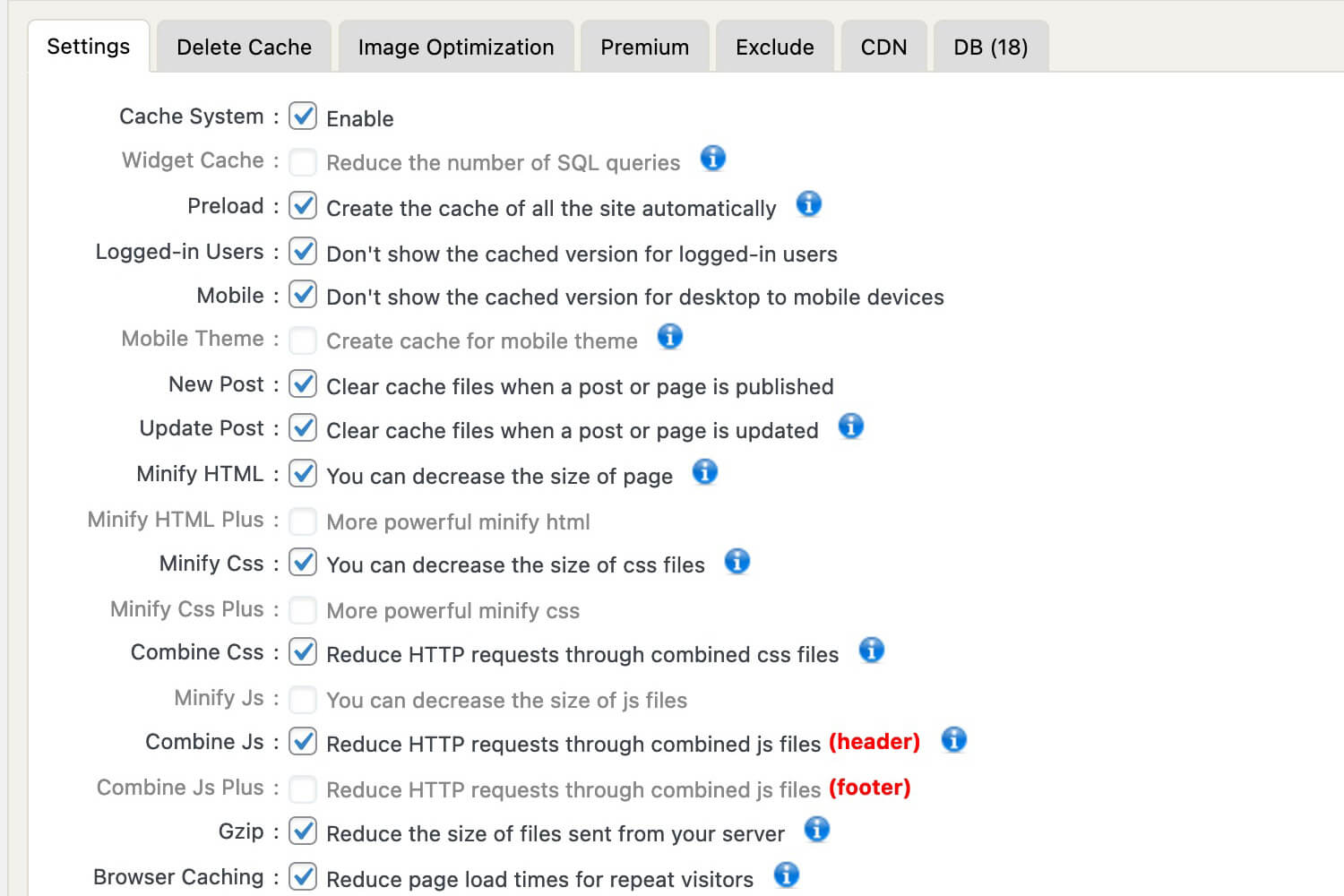
Administrators are equipped with an array of choices: from scheduling automatic deletion of cached files and minified CSS/JS files to toggling cache options for mobile users and those logged in. What sets WP Fastest Cache apart is its intuitive settings page – a feature-rich space where each function can be managed with just a checkbox. Notably, beyond merely minifying HTML and CSS, this plugin combines them, ensuring a streamlined code structure and optimized webpage performance.
Key Features:
- Browser caching
- Preload Cache – create the cache of all the site automatically
- Minify HTML and CSS
- Combine CSS/JS
- GZIP compression
- Clean-up – all cache files are deleted when a post or page is published
- Exclude pages from being cached
- Enable/Disable the cache option for mobile devices and logged-in users
- CDN + Cloudflare support
7. WP-Optimize
WP-Optimize is a cutting-edge plugin designed to empower website owners with the tools they need to enhance their WordPress site’s performance and efficiency. Developed by a team of seasoned professionals, this robust plugin ensures your website is optimized to its fullest potential, delivering an exceptional user experience.

With WP-Optimize, you can bid farewell to slow loading times and outdated databases. This plugin offers a comprehensive range of features that streamline your website’s performance, resulting in higher search engine rankings and increased website traffic. By eliminating cluttered databases, optimizing images in WordPress, and cleaning up unnecessary files, WP-Optimize maximizes your website’s speed and responsiveness.
Beyond optimization, WP-Optimize also prioritizes security. It automatically removes spam comments, revisions, and other malicious content, ensuring your website remains safe and protected against potential threats. Additionally, the plugin provides in-depth reports and analytics, allowing you to monitor your website’s performance and make informed decisions for future improvements.
WP-Optimize combines caching, database cleanup, and image optimization, so it suits users who want several speed tools in one plugin.
How to Choose the Right Cache Plugin for Your Needs
When selecting a cache plugin for your WordPress site, consider the following factors:
- Size and traffic of your website: Some cache plugins may be more suitable for smaller websites with low traffic, while others are designed to handle high traffic volumes.
- Compatibility with your hosting environment: Ensure that the cache plugin is compatible with your hosting provider and server configuration.
- Specific needs and requirements: Consider the specific optimization features you need, such as database optimization, CDN integration, or advanced caching options.
Conclusion
There’s no single best WordPress cache plugin for every site. LiteSpeed Cache is a strong option for LiteSpeed servers, WP Rocket is great for easy premium performance, W3 Total Cache suits advanced users, and Autoptimize works well when paired with a caching solution. Start with one plugin, test your speed, and avoid stacking multiple caching plugins at the same time.
In this article, we explored the top WordPress cache plugins available in the market. Each plugin offers unique features and benefits to help supercharge your website. Consider your specific needs and requirements when choosing the right cache plugin for your WordPress site.
Remember, improving your site’s speed is an ongoing process. Regularly monitor your site’s performance and make adjustments as needed to ensure optimal speed and user experience.
If you want to go further than caching alone, combining performance improvements with the best SEO plugins for WordPress can help strengthen both site speed and search visibility.