Ever landed on a WordPress site where the buttons were hard to spot or the text was too tiny to read? If you build or run websites, you’ve likely asked yourself: is my site ADA-compliant? Could visitors have trouble using it? The truth is, accessibility rules can feel overwhelming, but the simplest fix often starts with the right plugin. Accessibility plugins for WordPress help close the gap by adding features that make your site usable for everyone.
Web accessibility isn’t just a nice-to-have. It’s backed by laws like ADA, WCAG, and Section 508, and the number of lawsuits keeps growing. The good news? These plugins can handle a lot – text adjustments, better navigation, keyboard support. Most take just minutes to install. Anyone, at any skill level, can open up their site to more people, boost user experience, and stay ahead of legal risks. This guide covers the best accessibility plugins for WordPress in 2025 to help you get it right from the start.
Disclaimer: This article is for informational purposes only and does not constitute legal advice. For questions about accessibility law, ADA, WCAG compliance, or web-related legal risks, it’s best to consult with a qualified attorney. The insights shared in this article are intended to help WordPress users and website owners better understand accessibility options and best practices. Nothing in this article should be taken as legal guidance, nor can it be relied upon in any legal dispute or compliance investigation. Creating a fully accessible website often requires manual adjustments, code-level changes, and regular testing. While WordPress accessibility plugins can simplify the process, they are not a guarantee of legal compliance.
9 Best WordPress Plugins to Improve Accessibility
Below is a breakdown of the most trusted, popular, and effective accessibility plugins for WordPress in 2025 – including both all-in-one and specialized options. Whether you’re looking for simple fixes or full compliance features, there’s an option here for everyone.
1. WP Accessibility
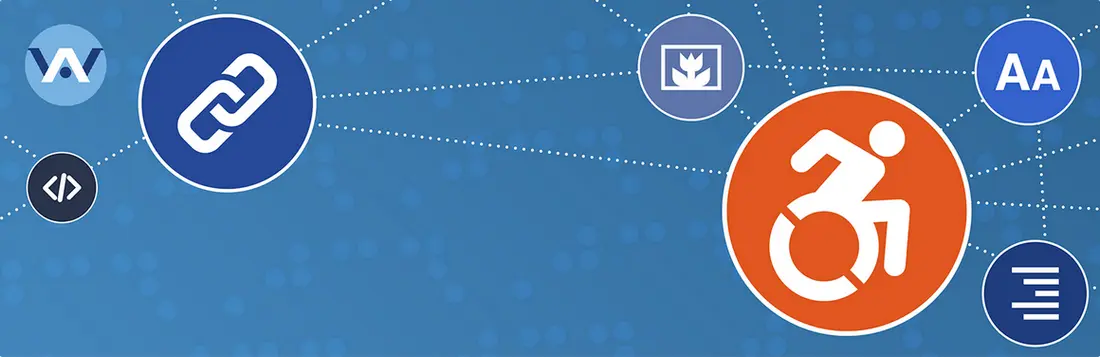
WP Accessibility gives WordPress sites quick upgrades that help real people use your content. Simple setup makes it work on most themes, even if that theme ignores users with vision or reading hardship. This plugin isn’t for big complicated overhauls – it fixes the small things that can make a big difference for everyone visiting your site.
Skip links are one of its strongest pieces. These links let users using screen readers or keyboard shortcuts jump straight to the good stuff – no need to scroll through endless menus first. That small tweak saves time and frustration. WP Accessibility also puts a focus outline around buttons or links when people tab or use a keyboard to move around, so no one gets lost or misses important spots. Finally, it lets colors and contrast be adjusted for those who find default themes too hard to read or see. Anyone can turn these features on or off, so every site feels more friendly for all users. These three features – skip links, focus outlines for keyboard use, and easy color/contrast tweaks – are why so many people reach for this plugin first.
Pricing: free version.
2. Ally – Web Accessibility & Usability
Ally – Web Accessibility & Usability stands out by keeping things straightforward for both creators and visitors. Right after install, site owners see a menu full of sliders and toggles – ready to use, with no special skills needed. The plugin includes a built-in tool that scans each webpage, spots trouble areas, and offers clear steps to fix them. Some adjustments can even be handled with one click or guided AI suggestions, so you don’t have to guess what to repair next. Want to make sure color contrast or image text is right? The checks are done right from your admin dashboard, making accessibility less of a guessing game.
The floating usability menu lets visitors fine-tune how the site looks and feels. This widget covers what people really ask for: bigger text, strong contrast, a “skip to content” button for easy movement, and options to pause moving graphics. Features can be adjusted instantly, so anyone – with or without assistive technology – gets a fair shot at using your site. For web creators, fine-tuning the widget to match site colors, move its icon, or turn options on and off for desktop or mobile is simple.
Pricing: free version.
3. WP Accessibility Helper (WAH)

WP Accessibility Helper (WAH) offers a direct way for WordPress site owners to address accessibility problems without having to modify any code. Once installed, visitors get an interface packed with switches and toggles. Users can set contrast modes for easier reading, bump up font sizes, or use high-visibility link highlights. The plugin also includes handy keyboard shortcuts, allowing quick access to the accessibility menu from anywhere on the site. Setup sticks to simple options, and most features work right out of the box, so there’s less time fiddling with settings and more time helping people interact with your content.
Each plugin feature is built to cover real barriers found on websites, giving visitors more freedom to explore and interact. This plugin fits both new and experienced WordPress users looking to make everyday web pages more open, in steps that matter most.
Pricing: free version and pro version from $229/year.
4. Accessibility by UserWay
Accessibility by UserWay makes adapting websites for people with different abilities simple. The plugin brings a toolbar to each page so visitors can pick the settings that work best for them. With one click, someone can switch text size, boost contrast, or use a dyslexia-friendly font. The widget stands out for supporting more languages than many others – making sites friendly to a wide variety of users across the globe. There’s also a built-in screen reader that helps people who rely on audio cues to read and browse pages. The settings for text and color are remembered on the same device, which saves time for visitors who always want things a certain way.
Another strength: UserWay helps site owners stick to standards like ADA and WCAG without learning every technical rule. Its AI scans a site for common trouble spots – like color clashes, missing labels, or items that can’t be reached with a keyboard. Fixes can happen automatically, cutting down on manual edits. For businesses that care about reaching everyone while also dodging legal headaches, the widget checks both boxes. Basic features go live for free, but advanced checks and language add-ons are available for a fee. This quick setup lets more people interact, shop, or read, without extra barriers getting in the way
Pricing: free version and premium version from $490/year.
5. All in One Accessibility

All in One Accessibility helps WordPress site owners make their pages friendlier for everyone, no matter their abilities. Setup is fast, requiring just a couple of minutes, and the widget blends in easily with most themes. This plugin covers a wide range of international standards, supporting laws like ADA, WCAG 2.1 and 2.2, Section 508, and more. Over 140 languages are supported, so global visitors find the tools in a language that suits them. The free version supplies essentials like screen reader adjustments, voice controls, and a simple way to boost color clarity and text size without coding. For those who want extra features, upgrading brings in more advanced add-ons: PDF accessibility tools, branding, live WordPress site translation, and detailed accessibility reports.
The widget automatically checks for common trouble spots, such as low contrast or missing descriptions for images, and gives users straightforward fixes. It helps with text-to-speech, lets people move around pages using just a keyboard, and adapts to all devices – phone, tablet, or computer. Color and style options for the widget can match the look of any site.
Pricing: 10 days free trial version and premium version from $250/year.
6. Accessibility Checker
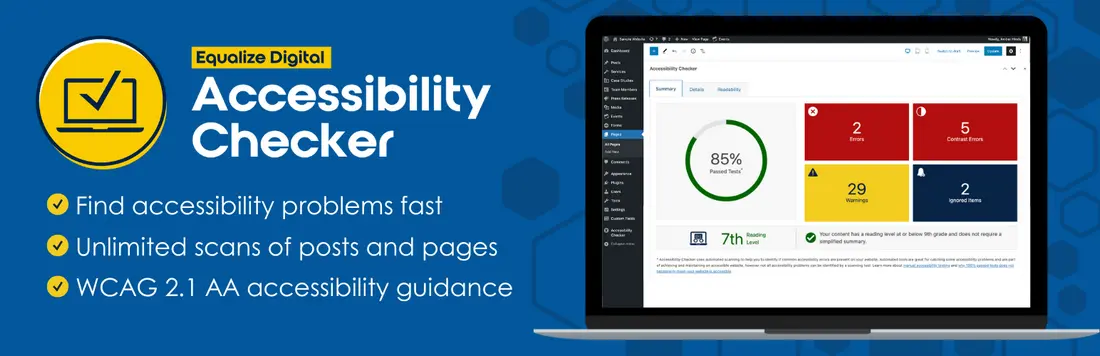
Equalize Digital Accessibility Checker puts accessibility checks right inside the WordPress editor. Every time a post or page is saved or published, the plugin runs over 40 automatic tests based on strict WCAG guidelines. If anything stands out – missing labels, bad contrast, or links that open in new windows without warning – it gets flagged on the screen. This fast feedback helps editors catch problems as they go, instead of after a site goes live. There’s no jumping to outside dashboards or waiting for scans to finish.
The tool fixes common issues with a single click and offers extra help through detailed documentation for each warning or error. Features like skip links, focus outlines, and forced underlined links can be activated to help visitors who use keyboards or screen readers. You don’t pay extra to scan lots of pages; every post and page can be checked without extra costs or limitations. With site-wide reports available in the paid version, large sites or teams get a simple way to spot major issues early and improve accessibility for all users.
Pricing: free version and premium version from $149/year.
7. Web Accessibility by accessiBe
Web Accessibility by accessiBe brings a smart way for any WordPress site to support people with disabilities, while lightening the compliance load for site owners. The plugin drops an accessibility widget onto each page, ready for visitors to make changes that fit their needs. Like the other accessibility plugins above, font sizing, color tweaks, and special contrast modes are just a click away. Someone can pause moving graphics or highlight key page elements.
On top of that, accessiBe uses AI to check for new issues every day. Each update means the website stays ready for fresh content, menus, or page layouts. There’s built-in help for screen readers and keyboard-only users, which makes sites friendlier for everyone. Special profiles bundle features for groups with specific disabilities – one click can switch settings for vision, learning, or mobility needs. With a free trial and fast install, the plugin is a direct path to better web experiences for every visitor.
Pricing: free trial version and premium version from $490/year.
8. Accessibility Widget by OneTap

Accessibility Widget by OneTap drops a feature-packed toolbar onto any WordPress site with little effort. No coding, no adjustments – just install, click, and your visitors get instant accessibility choices. The minimal design setup means a site owner can go from zero to accessible in seconds. OneTap works well with different WordPress themes and page builders, so you don’t need special knowledge to get started. The toolbar’s look and position can be moved and restyled, fitting in with your brand’s color palette.
This plugin is light, so website speed is never at risk. All features are bundled into one module – no extra add-ons required. The GDPR-compliant system collects no personal data, easing privacy worries for visitors and owners alike. If you need more help, 24/7 support answers questions at any hour.
Pricing: free version and premium version from $69/one site.
9. Equalweb Accessibility
Equalweb Accessibility makes adding web accessibility controls to WordPress sites simple for everyone involved. After a quick setup – just add a line of code – the plugin drops an accessibility icon on every page. The widget comes loaded with more than two dozen features, like voice command and color tweaks, so people with different needs can interact with web content in their own way. There’s no drag on load times, and the design always blends with the rest of the site.
For site owners, Equalweb Accessibility checks for issues as content changes and uses artificial intelligence to fix many problems instantly – no coding needed. More advanced plans include help from accessibility experts who test, give reports, and keep up with new guidelines. The tool supports 32 languages and does regular scans to spot trouble, so legal risks around ADA, WCAG, and Section 508 are less of a worry. This plugin fits global WordPress business sites, local stores, and anyone looking to welcome a wider group of visitors online.
Pricing: free trial version for 7 days and premium version from $39/month.
Choosing the Best Accessibility Plugins for WordPress
When picking the accessibility plugin for WordPress, start with your visitors. Are you running a WordPress blog for a broad audience, or does your site serve users who need screen readers, high contrast settings, or keyboard-only access? Think about what your visitors struggle with most: clear text, easy forms, or just a way to move around your site without a mouse.
The right plugin depends on what you need most:
- Quick fixes vs. deep checks: Some plugins focus on instant changes, like font size or contrast. Others scan your whole site and flag problem spots, offering step-by-step fixes and reports.
- Language needs: Do your users speak different languages? Pick a plugin with solid multi-language support.
- Legal peace of mind: Laws like ADA or WCAG matter – if compliance is essential, go for plugins offering ongoing audits or legal documentation.
- Hands-off or hands-on: Want to set things up and forget them? Or do you prefer regular updates with fresh reports and insights?
If you’re new to website accessibility, just getting started is a win. Free plugins like WP Accessibility or One Click Accessibility can handle basic tools and help you learn fast. Larger sites, digital agencies, or anyone with legal risks might choose premium plugins that offer audits, support, and ongoing monitoring for stronger, long-term protection and a truly inclusive user experience. Whatever your needs, the best accessibility plugins for WordPress are out there to fit every situation and skill set.
Final Thoughts: Accessibility Isn’t Optional Anymore
Websites aren’t just code – they’re how people work, shop, learn, and connect. By using one of the best accessibility plugins for WordPress in 2025, even small site owners can open their doors to a broader orld, build brand loyalty, boost engagement, and stay on the right side of the law.
With so many accessible, easy tools available now, there’s never been a better time to get started.
Remember: the best accessibility plugins for WordPress are the ones that keep your site open to everyone, every day.